899U Game supports four payment methods for deposits and withdrawals. JazzCash, EasyPaisa, bank transfer, and crypto wallet. All withdrawals are processed with zero platform charges and zero tax deductions. What you request is what arrives.
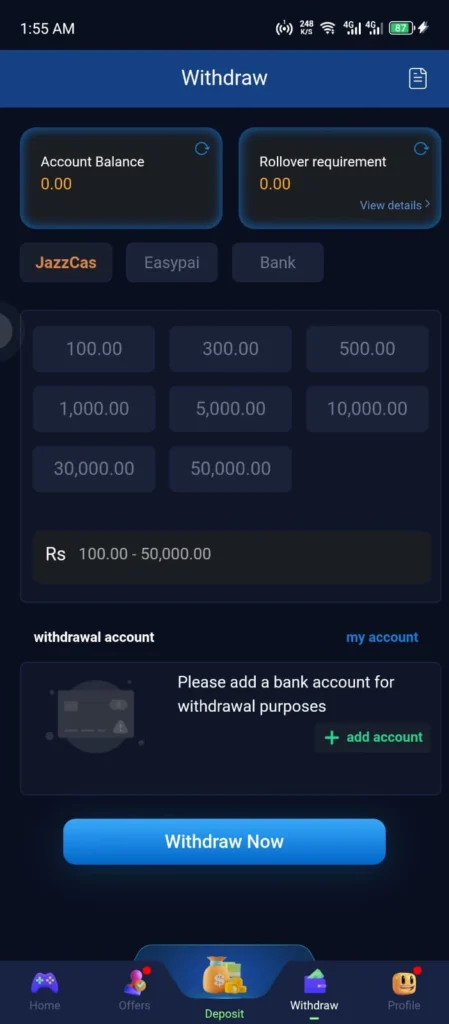
Payment Methods
| Method | Type | Processing Time |
| JazzCash | Mobile Wallet | Within minutes |
| EasyPaisa | Mobile Wallet | Within minutes |
| Bank Transfer | Direct Bank | A few hours |
| Crypto Wallet | Digital Currency | Network speed dependent |
Minimum Deposit
The minimum deposit on 899U Game Apk is 100 PKR for JazzCash and EasyPaisa. Crypto wallet minimum deposits depend on the current network minimum. Check the deposit section inside the app for current limits.
How to Deposit Money
Step 1: Log in and go to the Wallet section.
Step 2: Tap Deposit.
Step 3: Choose your payment method: JazzCash, EasyPaisa, Bank Transfer, or Crypto Wallet.
Step 4: Enter the amount you want to add.
Step 5: Follow the payment details shown inside the app for your chosen method.
Step 6: Complete the payment.
Step 7: Your wallet balance updates within minutes for local wallets. Crypto deposits confirm based on blockchain network speed.
How to Deposit Using JazzCash?
- Select JazzCash in the deposit section
- Note the account number and payment reference shown on screen
- Open your JazzCash app or use the JazzCash USSD code
- Send the amount to the account number shown in the app
- Include the payment reference in the description field
- Return to 899U Game and wait for your balance to update
How to Deposit Using EasyPaisa?
- Select EasyPaisa in the deposit section
- Note the account number and reference on screen
- Open your EasyPaisa app or use the USSD option
- Transfer the amount to the account shown in the app
- Include the reference number in the description
- Return to 899U Game and your balance updates within minutes
How to Deposit Using Crypto Wallet?
- Select Crypto Wallet in the deposit section
- The app displays a wallet address and network type
- Send your USDT or supported cryptocurrency from your external wallet to the address shown
- Use the exact network type displayed. Sending on a different network can result in permanent loss of funds.
- Wait for blockchain confirmation. This varies by network but is typically fast.
- Your wallet balance updates once the transaction is confirmed on chain.
Common Deposit Mistakes to Avoid
- Sending to any account number not shown inside the 899U Game app at the time of transaction
- Sending crypto on the wrong blockchain network
- Closing the app before the balance updates
- Attempting the same deposit twice before checking with support
- Missing the payment reference number in the transaction description
How to Withdraw Earnings?
Step 1: Go to the Wallet section and tap Withdraw.
Step 2: Enter the amount you want to withdraw.
Step 3: Select JazzCash, EasyPaisa, Bank Transfer, or Crypto Wallet.
Step 4: Enter your payment account details carefully. Check every digit.
Step 5: Review all details on the confirmation screen.
Step 6: Tap Confirm.
Step 7: JazzCash and EasyPaisa withdrawals arrive within minutes. Bank transfers take a few hours. Crypto withdrawals confirm at network speed.
Zero Charges on Withdrawals
899U Game does not deduct any platform fee or tax from your withdrawal amount. Your full requested amount is sent to your payment account. Standard charges from your payment provider may apply on their end depending on your account type and the transaction amount.
Pre-Withdrawal Checklist
- Account is verified and mobile number is confirmed
- Payment account number saved in the app is completely correct
- Withdrawal amount meets the current minimum requirement
- No unresolved deposit disputes on your account
- Withdrawing to your own registered payment account
Common Withdrawal Mistakes to Avoid
- Wrong account number: One incorrect digit causes most withdrawal delays. Check twice before confirming.
- Third-party account withdrawals: Always withdraw to your own registered payment account.
- Multiple simultaneous requests: Submit one withdrawal at a time.
- Crypto network mismatch: Ensure the withdrawal network matches your receiving wallet’s network.
Deposit and Withdrawal Summary
| Action | Minimum | Charges | Time |
| Deposit (Local) | 100 PKR | None by platform | Within minutes |
| Deposit (Crypto) | Network minimum | None by platform | Network speed |
| Withdrawal (Local) | Check in-app | None by platform | Within minutes |
| Withdrawal (Bank) | Check in-app | None by platform | A few hours |
| Withdrawal (Crypto) | Check in-app | None by platform | Network speed |
FAQs
Does 899U Game charge fees on withdrawals?
No. The platform charges zero fees and zero tax on withdrawals. Your full amount is sent. Your payment provider may apply their own standard charges.
How long do JazzCash withdrawals take?
Most JazzCash and EasyPaisa withdrawals arrive within minutes. Delays are almost always caused by an incorrect account number saved in the app settings.
My deposit has not appeared after ten minutes. What do I do?
Contact support through live chat with your transaction reference number, payment method, amount, and time. Do not attempt the same deposit again before hearing from the team.
Is crypto deposit safe on 899U Game?
Yes. Crypto transactions go through verified wallet addresses shown inside the app. Always use the exact wallet address and network type shown at the time of your transaction. Never send crypto based on an address shared outside the official app.
Can I withdraw using a different method than I deposited with?
You can withdraw to any of your registered payment accounts. Contact support if you need to update your registered payment details before withdrawing.
How to Deposit and Withdraw on 899U Game Apk (2026)

Learn how to deposit and withdraw on 899U Game using JazzCash, EasyPaisa, bank transfer, or crypto wallet. Zero withdrawal charges. Full step by step guide Pakistan 2026.
Price: Free
Price Currency: PKR
Operating System: Android 5.0 and Above
Application Category: Casino Game
4.9